

The joy of every creator, brand or individual on Facebook is having as many people as possible share their posts. Posts reach a wider audience when shared by multiple people. For brands, this means increased brand or product awareness. For all types of Facebook users, having multiple people share a post can increase follower count.
But the big question is how to see who shared your post on Facebook. Is it possible to know who shared your post on Facebook? The short answer is yes. In this post, we’ll discuss how you can find out who shared your post on Facebook. Keep reading for more information on this topic.
How To See Who Shared Your Post On Facebook: A Step-By-Step Guide
Now, let’s discuss how you can see the Facebook users that were so kind enough to share your posts.
Method 1: Check your Facebook Notification (Bell Icon):
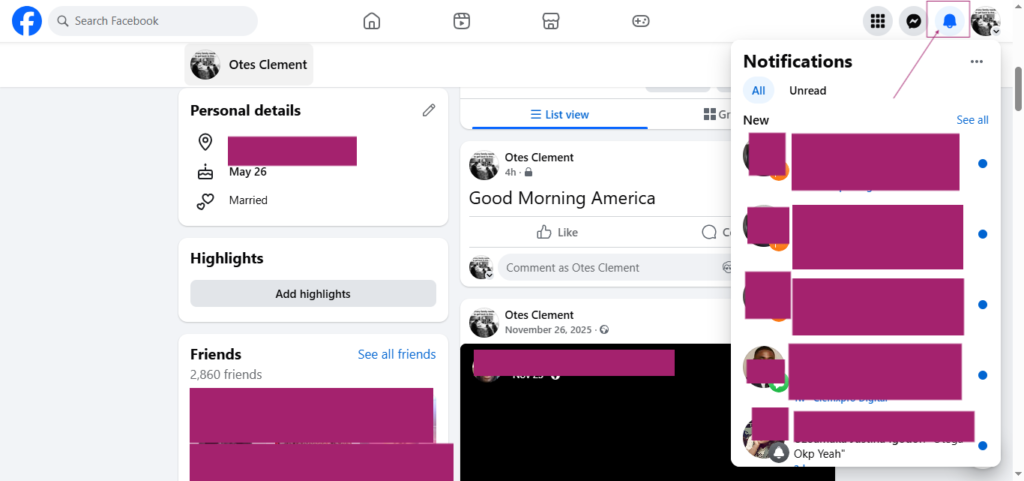
You can see who shared your Facebook post in your notification feed if the person is a friend or shared the post publicly.
Unfortunately, you won’t get notified if the post is shared privately or due to privacy settings.
To know who shared your post, open the notification “Bell Icon.” There, you will find notification messages of people who shared your post to their profiles.
Method 2: Check the main post on your profile:
You can find out who shared your post and the number of times it has been shared, on your main profile. Here’s how to go about it.
- Find the post you want to check.
If you’re on your main profile, start searching for the post. If it’s a recent post, it will appear at the top of your profile. You can easily spot the post.
If it’s an old post you’re curious to know who shared and the number of shares the post has had, you can scroll down to find the post. Another simple way to find the post is via Facebook search.
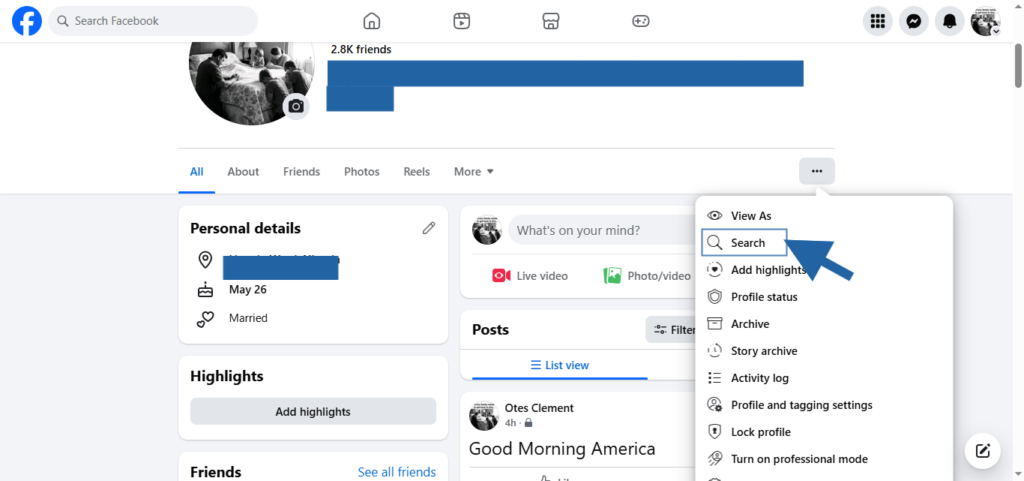
Search for the post you’re curious to know the number of shares received and the people who shared it. Use the title to find the post quicker and easier.
- Check the number of times the post has been shared:
You don’t need any special tool or process to know the number of times people have shared your post. Just locate the post and you’ll see the number of times it has been shared.
You will find something like 1 share, 2 shares, 3 shares, etc. those figures indicate the number of times the post has been shared by other Facebook users.
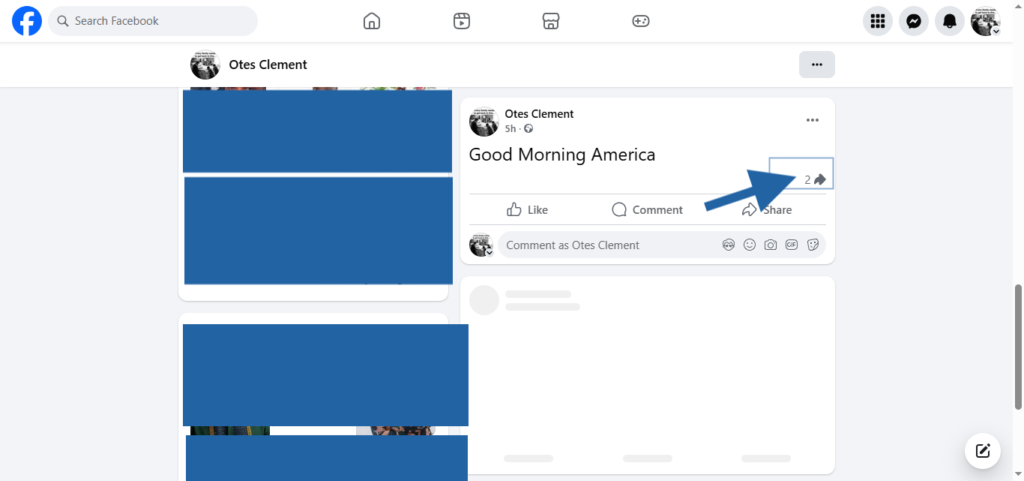
- Check who shared your post:
You can find out who shared your post by selecting “Share” or “Shares.” If you’re using a desktop, just place your mouse on the option Share/Shares and the names of those who shared your post will appear.
9 Ways to Get More Facebook Post Shares
If your interest is to increase your friends list or followers count organically, you should be thinking of how to increase your Facebook shares.
Maybe you have been getting zero or a handful of shares and looking for ways to increase it. Now, you’re seeking ways to generate more shares. You know the more shares you get, the more people your posts will reach.
Your followers count or friends list can increase massively once you’re able to increase your post shares. Here, we discussed ways you can generate more shares with ease. Let’s dive in!
- Find out what your audience likes:
Have you discovered the sort of posts your audience likes? Do they like funny or educational posts? If they like funny posts, particularly short form videos, keep creating and publishing funny posts.
If your audience likes educational tips and guides, focus on creating such for them. Give your audience what they like; they’ll respond with more shares. People feel comfortable sharing posts they like. So, if you can make your posts entertaining or educational, you’ll generate more likes.
- Off great value:
Another effective way to get more shares is to start offering value. Ensure your content is great value to get your audience interested. People will share content they find valuable with ease.
So, if you want to generate more shares, start offering content with great value. Always ask yourself; will my followers find the content I want to post relevant? Will the content offer value to my audience?
If your answer is yes, go ahead and share your post. But if you don’t think your content is valuable, don’t bother sharing it. Work on something else you think would offer better value to your audience.
If your content is of great value, you’ll generate more shares comfortably. Your audience will willingly share your contents to their contacts.
- Get more creative:
Want your brand’s post to generate more shares? Then get more creative. Accompany promotions and contests with surveys or forms. Use creative materials that will encourage your audience to engage with your posts. Your creativity will make the difference.
- Post consistently:
Consistency is important when trying to grow a Facebook account. The Facebook algorithm favors pages that post consistency. Your audience will also appreciate and take you seriously if they can always rely on you for quality posts.
How consistent should you be? You can post as much as 5 to 6 times per week. You can post from Monday to Friday or skip one or two days in between.
The most important thing is to keep your audience engaged. Don’t let your Facebook account stay without a valuable post for a long period. Your audience won’t take you seriously if you treat your Facebook account this way.
- Incorporate a CTA:
What is your call to action? What action do you want your audience to perform? Do you want them to like, share or comment on the post? Indicate it towards the end of the post.
CTAs are powerful and would remind your followers or friends of the action you want them to perform. So, include a call to action in all your posts.
- Be relevant:
People have a fair amount of knowledge about most topics. They can even research the topic on Google or use AI to get more ideas, and then compare the results with yours. So, be relevant.
Post what you have extensive knowledge on. Express yourself also. Convince your audience that you know what you’re writing about.
- Use authentic voice:
Be yourself. Share your views. And always remember that the people, followers, and friends following you are doing so because they like what you’re doing. They like your voice, and your take on issues. Don’t change that for anything, otherwise your followers, friends and fans will lose interest in your content.
Keep sharing unique content in your brand voice. Keep being you. That way, people will keep following you. They will also be confident enough to share your posts to others.
- Use eye-catching visual materials:
A picture says a thousand words. People assimilate information faster when presented in graphics form.
Use images and infographics in your posts creatively. Complement your graphics with text. Use quality images in your posts.
Use images or graphics you have the rights to use. Avoid using copyrighted materials. You can use AI to generate quality and human-like images for your posts. There’s no harm in doing so.
- Post at the right time:
Timing is everything, even in content creation. Knowing when to post is crucial for account growth and engagement.
How do you know the right time to post?
Analyze your audience to know when they are most active. You can discover this through careful analysis. Check when they engage with your posts the most. That will give you a better idea of the right time to post.
Your class of business is also key in determining when to post. For example, 7am to 12pm is the most ideal time for restaurant businesses to post. They get the most engagements when they post during these periods.
The right time to post depends on your audience too. Since time zones differ from one region to another, you can identify the time your audience will be most active.
Conclusion
We have explained how to see who shared your post on Facebook. We discussed the two ways you can figure out who shared your posts, including how you can know the number of times your post has been shared.
You don’t need a third-party app to know who shared your post. You can find out if you’re using Facebook desktop by locating the post and placing your mouse on “Share” or “Shares” displaying on the post.
The people who shared your post will appear when you place your mouse on “Share” or “Shares.” We also discussed the different ways to increase your Facebook shares. You can read through the post for better understanding.