
If you’re reading this, then you probably have experienced what frightens most Instagram users: drop in followers count. You had high hopes of acquiring a certain number of followers before a certain period, but the reverse is the case. Your followers count keeps dropping and now, the main thing on your mind is how to see who unfollowed you on Instagram.
If this explains your present predicament, you’re not alone. Many IG users are experiencing the same thing. Unfortunately, Instagram won’t notify you when people un-follow you. You’ll only see your followers count drop.
In this post, we’ll discuss the different ways you can identify people that unfollowed you.
How to See Who Unfollowed You on Instagram
You can discover who unfollowed you on Instagram using 2 different methods which we will be explaining shortly. Here is a summary of the three methods you can use to discover who unfollowed your IG account:
- Manual method
- Third-party application
Let’s discuss how each method works:
Method: Manual method to discover who unfollowed you on Instagram
The manual method to discover who left unfollowed your IG account is straightforward. But, make no mistake; the process can be tedious and time-consuming. It can be highly stressful if you have a huge follower count.
How does the manual method work? Follow the steps below:
- Login to your Instagram account
- Go to your Instagram profile
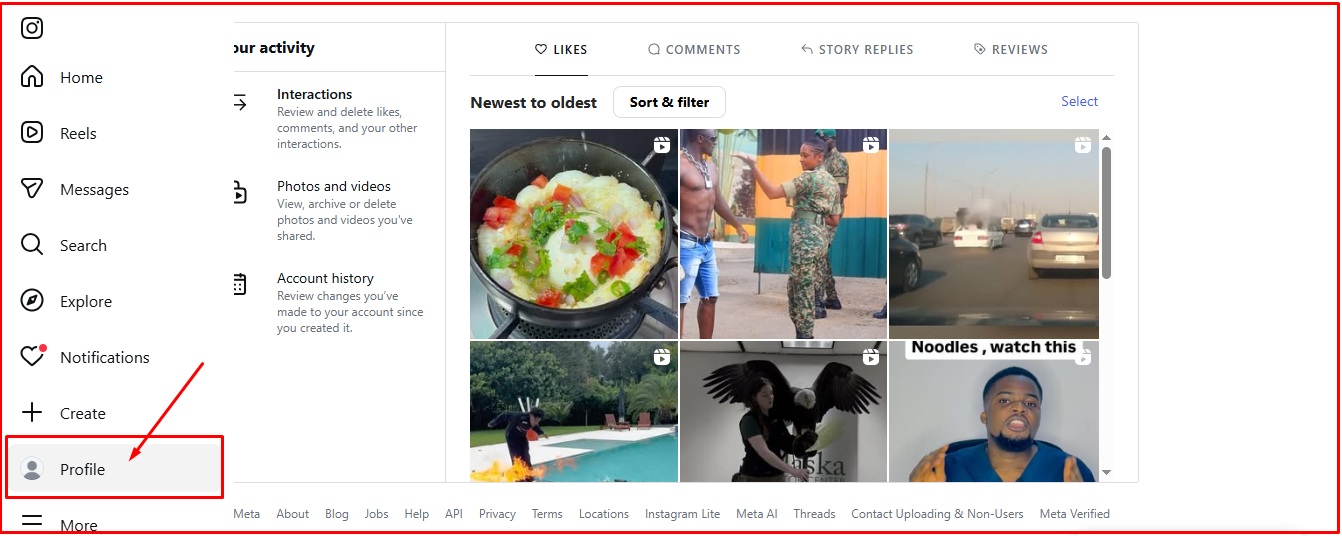
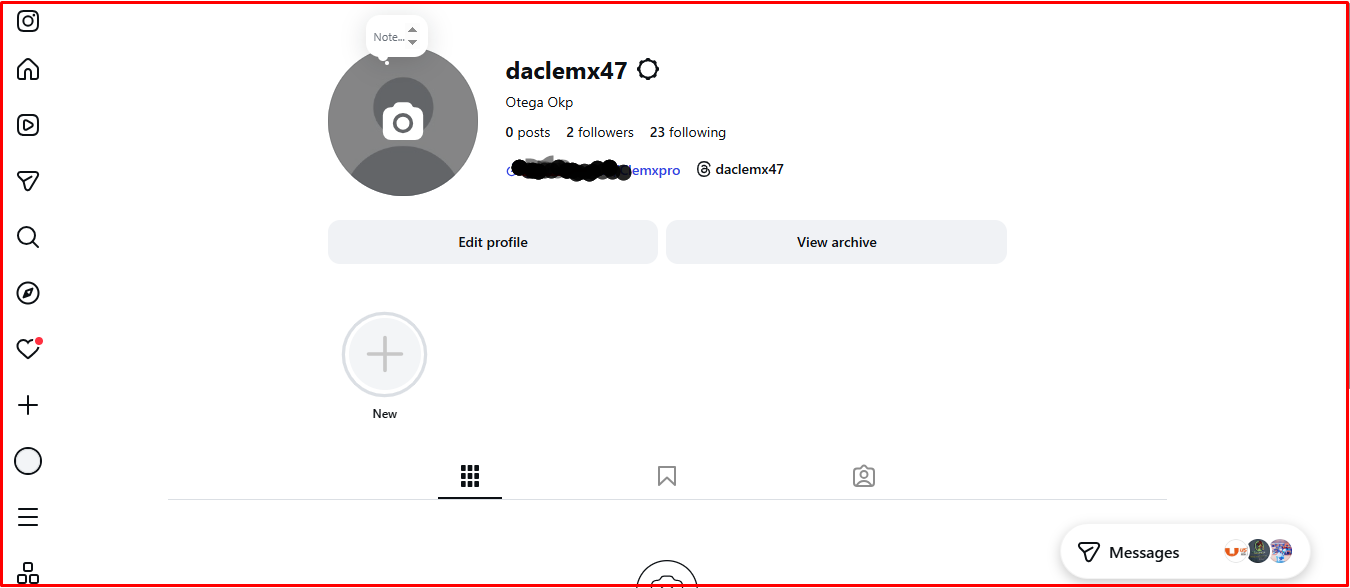
- Tap on “Followers
- Search for the individual you suspect unfollowed you. Search for them using their username.
This method works best if you have a good knowledge of your followers. Unfortunately, IG users with a large follower count might have a hard time remembering all their followers’ username. It’s easier to remember the usernames of active followers and clients.
Here’s how to know who unfollowed you:
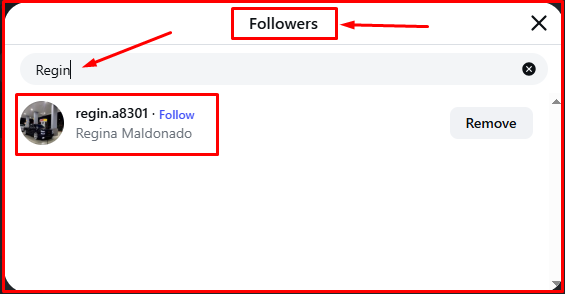
If the username you searched for in your followers list appears, then you’re good. It means the person is still following you.
If the username you searched for doesn’t appear, and you’re sure that the person has been following you, then they have unfollowed you.
How to Spot one-way follows
One way follows are very common. One-way follows happens when you follow someone and they never follow back. A person you follow also follows you, but suddenly unfollows you. One way follows can happen that way.
How do you spot these kinds of followers or identify one way follows? It’s simple:
- Login to your Instagram account:
- Visit your IG profile:
- Click on “Following” as shown in the image below:
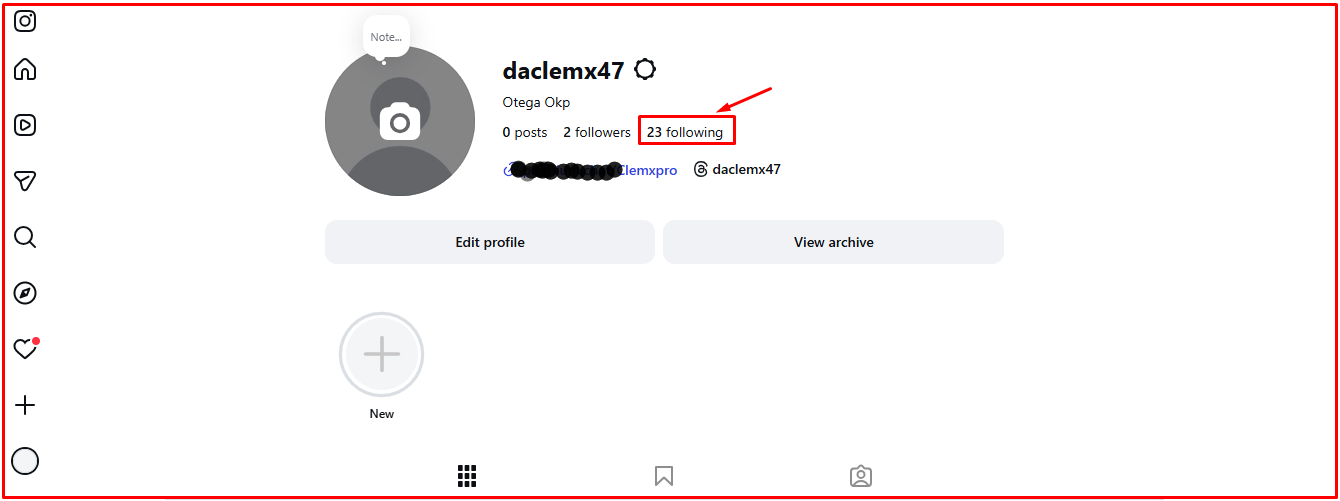
- Compare the people on your following and followers list.
- Check the IG accounts you’re following that aren’t following you back.
- If you’re following an IG account that follows back but later unfollows you, you’ll find them on the “following” list. Unfortunately, they won’t be on your followers list.
- You can take a screenshot of your followers list at the start of the week. The essence is to compare your follower count at the end of the week. That way, you can quickly spot any account that unfollowed you.
Taking screenshots of your followers at the beginning of the week saves you the stress of cramming the names of multiple followers in your head. It would be too much for you and you can’t remember everyone.
Pro Tips: If you discover that there are multiple one-way follows in your IG account, it could be because you stopped rendering value or drifted. Your posts are probably boring or of less value.
The manual method is tedious and time-consuming. It also works best for small accounts.
Method 2: Using third-party application:
You can track your followers count and spot who unfollowed you in real-time with third-party applications. Several third-party applications with such capabilities used to possess such features. Unfortunately, Instagram no longer grants access to several of such applications.
Privacy concerns is the reason Instagram cracked down on applications rendering on-app follower count tracking. The platform views giving third-party apps access to followers unsafe for privacy reasons.
While cases of abuse from third-party apps weren’t rampant, there’s a possibility of it becoming an issue for the platform. Granting malicious apps access to followers on an IG account is a huge risk, even if the account holder was the one who authorized it.
Are there third-party apps that help monitor follower count and can notify you when someone unfollows you? Yes, there are apps with such functions. But you have to check each app properly before granting it access to your followers list for tracking purposes.
Allowing malicious apps to access your Instagram account and followers list is a huge risk. A third-party app with ulterior motives can make moves that could jeopardize your account’s integrity and your reputation. Just be careful when choosing a third-party app to track your IG’s followers count.
Why Most Unfollower Third-Party App Feels Unsafe to Use
While most third-party apps make it possible to track followers and know when someone unfollows you, they aren’t entirely safe to use. Most of these apps request access and data that doesn’t sit well with Instagram.
To do their work, most of the third-party apps:
- Request full login details for access to the account
- Permission to scrap account activity
- Access to data Instagram doesn’t like releasing.
These activities break Instagram’s terms of service. It can lead to the termination of your account too.
Instagram offered a route users can use to identify who left their followers list. One simple way is to download account information.
When you download your account information, you can see who unfollowed you. The data downloaded usually contains your followers and following list. All you need to do is compare both lists to see who left or unfollowed you.
What You Can Do When You See Who Unfollowed You on Instagram
People may choose to unfollow you on Instagram for diverse reasons. It doesn’t mean you’re a terrible person or unworthy to have an Instagram account.
So, what can you do when you discover the people that unfollowed you on Instagram? You can do the following:
You can unfollow the person:
This is tit-for-tat. If you discover that someone you have been following who follows you have decided to unfollow you, you can unfollow the person.
One of the reasons most people unfollow others is to reduce their “following” count. They often do this when their following count is higher or equal to their followers count. They want others to think they attracted the followers they have because of the value they provide.
So, you can unfollow anyone that unfollows you because they want to reduce their following count. Greed forces must IG account holders to do such.
Reach out to the person that unfollowed you:
Most people want to be pampered. They will appreciate it if you contact them to ask why they unfollowed you.
Reaching out to people that unfollowed you shows you care about your followers and are vigilant. Most people will be happy to follow back.
But take note; most people can be rude. They can ignore your message or respond harshly. Just prepare your mind for anything. You can get a good or bad response when you contact a follower that unfollowed you.
Follow the person:
If someone unfollowed you, they might have done so for several reasons. One of the reasons might be because they wanted you to follow back, but you failed or took too long.
Another reason might be because the content you post is no longer valuable or a deviation from your usual content. Most people can unfollow you for that.
Irrespective of the reasons someone unfollowed you, you can follow them. Take this first step to capture their attention. Most people might follow back when they see that you’re not following them despite the fact that they unfollowed you.
Ignore the person that unfollowed you:
Instagram has over 3 billion monthly active users. That’s almost half the world’s population. So the world won’t end because someone unfollowed you for reasons best known to them. You won’t stop existing either, neither will your Instagram account.
If someone unfollows you, you have to decide whether you want to reach out or totally ignore them. People come and go. Even if half of your Instagram followers leave today, you can recover back in little or no time.
Just stay consistent. Post consistently and keep doing the things that attracted people to your IG account in the first place.
Conclusion
We have explained how to see who unfollowed you on Instagram and the different actions you can take. You can see who unfollowed you using manual methods or relying on third party applications.
People can decide to unfollow you on Instagram for diverse reasons. For some, the reason they unfollow others is to reduce their following list to ensure their followers count is higher. They use that to convince others that people are following them genuinely, not because they followed them and got follow backs.
You can know who unfollowed you on IG and take necessary steps to win them back. You can get those who unfollowed you to follow back by following them, reaching out or keep rendering value through the quality of your content.