
Unless your posts are for personal consumption, which is rare for a Facebook user or brand, you probably want as many people as possible to share your posts. And you probably know how to make a post shareable on Facebook or need help understanding how it’s done. In either case, you’re in the right place!
Making your posts on Facebook shareable means you can reach more people. The higher the number of people that share your post, the more the views, and engagements. Getting more shares on Facebook can speed up your growth on the platform. Your follower count could increase massively.
Here, we took our time to explain how you can make your posts shareable on Facebook. Keep reading for more details.
How to Make a Post Shareable on Facebook
The benefits of making a post shareable on Facebook are enormous. People that want to grow on Facebook make their posts shareable.
Here, we explained how you can make your posts shareable on the Facebook platform, so your followers can share them to reach a wider audience.
Follow the steps below to make your posts shareable:
Step 1: Head to the Facebook post you’re looking to make shareable.
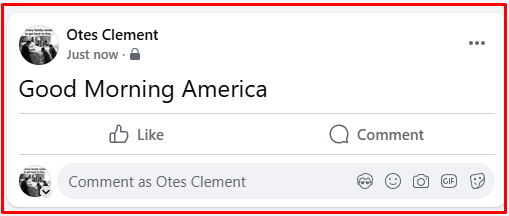
Select the Facebook (FB) post you want to make public. You can see that the post above doesn’t have a share button. You will only find the like and comment button.
Other Facebook users can’t share such posts. They can only like or comment on the post. There is no share option.
On the top right hand corner of the post, click the three dots.
Step 2: Select “Edit Post” from the menu
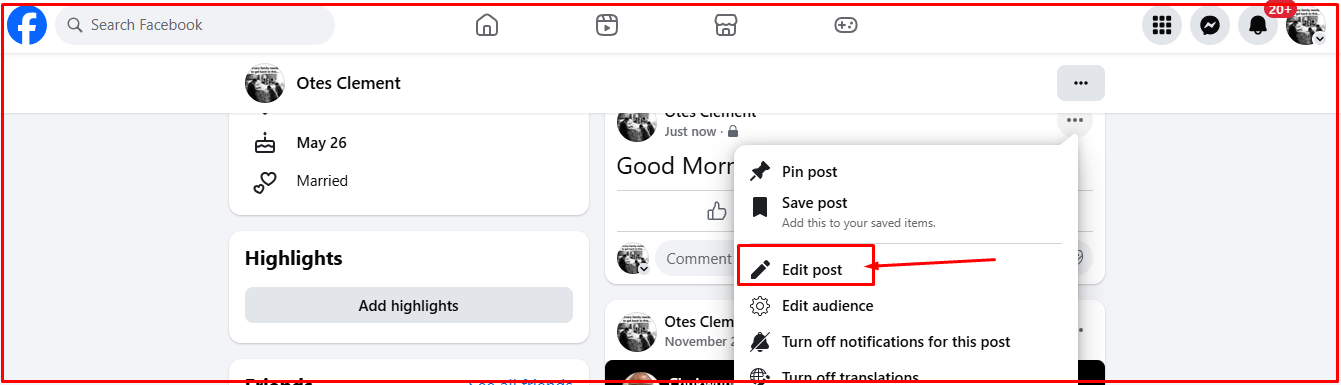
When you click on the three dots, a range of options will pop up. You’ll find the option to edit posts, edit audience, turn off notifications for this post, etc.
The option to choose is the first one which says “edit post.”
Step 3: Click on “Edit post”
Click on the “Edit Post” option and then “Only Me.” From this point, you can set the post to public.
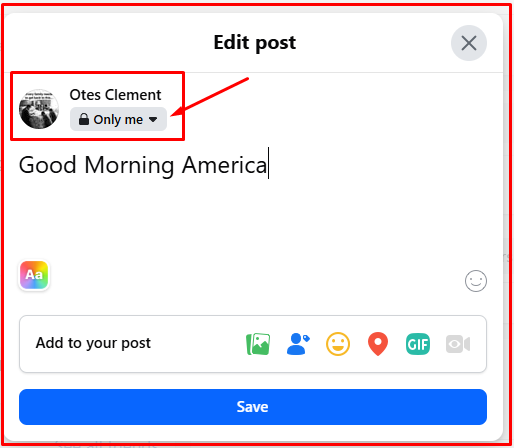
Make the post public so that everyone can see and share to their profiles.
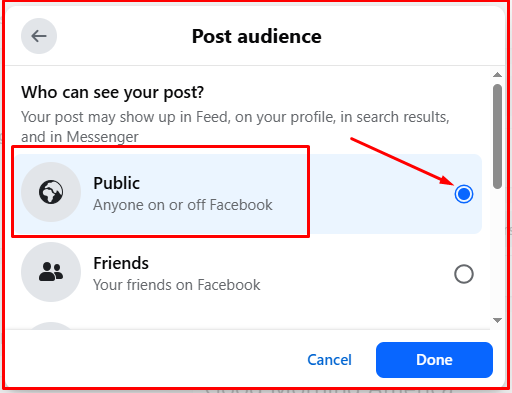
Once you’re done setting the post to public, click on “Done.”
With this setting, anyone can share your posts with ease.
Why Should You Make A Facebook Post Shareable?
To make a Facebook post shareable means you are comfortable allowing everyone on Facebook and even outside the platform (including friends and non-friends) view the post. It means you believe the post will benefit others.
Why should one make a Facebook post shareable? Here are a couple of reasons to do so.
- To share expert knowledge and information on a topic:
We aren’t short of knowledge on several important topics because some people chose to make their posts and even articles shareable. They chose to make their knowledge of the topic accessible. Whether it’s through a Facebook post or comments, sharing Facebook posts makes knowledge and information available to a wider audience.
If you have a piece of information you think others can benefit from, go ahead and make your post shareable. Making your post shareable means more people will encounter it as the number of shares increases. You could save or change lives with this simple act.
Consider sharing only information or knowledge you know is accurate. Avoid sharing inaccurate or unverified information about any topic be it health, politics, finance, education or any niche.
Information spreads faster and making a post shareable means more people will come across the post. If you share wrong information, you could ruin a lot of lives.
- Draw the attention of locals to local events or issues:
People who are actively involved in their communities ought to make their Facebook posts shareable for obvious reasons. Making a post about a local event or issue shareable means the information will get to more locals.
When you make a post about a local event shareable, chances are more locals will come across your post and attend your event. Getting more shares will increase the likelihood of more people attending your event. If the success of your event hinges on the number of attendees, making your posts about the event shareable and getting more shares will help you achieve your aim.
If the post is about local issues in your community, making your posts shareable means more people in that community could encounter your post and know what’s happening in their dear community. Even the ones affiliated to the community but live far away will know what’s happening within the community via your Facebook post.
- Sharing is fun and entertaining:
Imagine sharing a funny post that received multiple shares from friends, family, and classmates. Their reactions on the post and shares will make the process fun, encouraging you to keep creating such posts.
- Increase engagements and financial benefits:
One reason people make their posts shareable or a reason you should make your post shareable is to generate higher engagements. Since Facebook is now monitize-able, higher engagement means a better chance of generating higher revenue.
Facebook pays creators who meet their monetization requirements and gets monetized. They pay for engagement and views on pays, whether it’s text post or video.
Making your posts shareable means other people will share your posts. This means more people you couldn’t reach on your own will stumble on your posts, react to them or even decide to follow you on Facebook.
Note: You can’t monetize a regular Facebook account. You can only monetize a regular Facebook profile changed to professional mode. However, you can monetize a Facebook page.
- Opportunity to increase follower count:
Whether it’s your Facebook page or regular profile, making your posts shareable can increase your follower count or friends list. People will share your posts on their pages or profile if they find them valuable. The more shares you get the higher the number of people that will stumble on your post.
The higher the number of people that encounter your shared posts, the higher your chances of getting more Facebook followers or friends.
- Create brand awareness:
Making your Facebook posts shareable is a proven strategy to create brand awareness. Your posts could reach thousands of prospects when people share them on their profiles.
Brands looking to promote a new product need to make the share button available on their Facebook posts. Enabling the share button gives FB users the freedom to share your posts to their audience. That way, you can reach a wider audience, and create a solid awareness for your new product.
Why Most People Make the Share Button on Facebook Posts Unavailable
Most people turn off the share button on their Facebook post for several reasons. But the main reason centers on privacy; they want to have absolute control of their Facebook post.
When you enable the share button on a Facebook post, chances are your post will reach people who aren’t in your friends list or follow your brand. That means your post will receive comments from both people who don’t share the same view as you.
Most people in your friends list are practically people who share the same views with you. They have a better understanding of the angle you’ll take when you write about a specific topic.
Most people disable the share button from their posts to prevent their posts from getting shared to diverse audiences. They don’t want an audience that will misunderstand them.
People also remove the share buttons from their posts when they are unsure of the information in their posts. They disable the share button to keep their posts for their audience’s consumption alone.
How To Disable Share Button From A Post on Facebook
You can set your posts to public, only me or friends. If you set your post to “Only Me,” then you are the only one that can read and comment on your post.
By setting your posts to “Public” all posts published on your Facebook account will automatically have the share button. Your friends and non-friends who stumble on your posts can share them.
To remove the share button from a post, set your post to “Only Me.” Your post will only have the share button once published when you set it to “Public.”
Conclusion
You can see how to make a post shareable on Facebook. You can make a post shareable before or after publishing. To make a post shareable before publishing, switch to public.
If the post is on “Only Me” and other settings, you can change to Public. Switching to public will make the share button on your post available. That way, other Facebook users, including friends and non-friends that stumble on your post can share it.